
#yeelink.light.lamp42
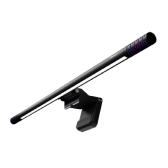
Yeelight 显示器挂灯2 Pro
urn:miot-spec-v2:device:light:0000A001:yeelink-lamp42:1:0000C802
Language
Service tree
Light#2 · light7 properties5 actions
Light
#2 · light
Properties
Switch Status
#1 · on
- Format
- bool
- Access
- R / W / N
- Value
- —
Brightness
#2 · brightness
- Format
- uint8
- Access
- R / W / N
- Value
- 1 ~ 100, step 1 percentage
Color Temperature
#3 · color-temperature
- Format
- uint16
- Access
- R / W / N
- Value
- 2700 ~ 6500, step 1 kelvin
Default Power On State
#4 · default-power-on-state
- Format
- uint8
- Access
- R / W / N
- Value
- 0Default1On2Off
Brightness Delta
#6 · brightness-delta
- Format
- uint8
- Access
- Value
- 1 ~ 30, step 1 percentage
Color Temperature Delta
#7 · color-temperature-delta
- Format
- uint16
- Access
- Value
- 200 ~ 2400, step 100 kelvin
Mode
#5 · mode
- Format
- uint8
- Access
- R / W / N
- Value
- 0Auto1Office2Party3Reading4Leisure5Custom16Custom27Custom38Custom4
Actions
Toggle
#1 · toggle
Brightness Down
#2 · brightness-down
Input
#6Brightness Deltauint8
Brightness Up
#3 · brightness-up
Input
#6Brightness Deltauint8
Color Temperature Down
#4 · color-temperature-down
Input
#7Color Temperature Deltauint16
Color Temperature Up
#5 · color-temperature-up
Input
#7Color Temperature Deltauint16
Delay#4 · delay3 properties
Delay
#4 · delay
Properties
Delay
#1 · delay
- Format
- bool
- Access
- R / W / N
- Value
- —
Delay Time
#2 · delay-time
- Format
- uint32
- Access
- R / W / N
- Value
- 1 ~ 60, step 1 minutes
Delay Remain Time
#3 · delay-remain-time
- Format
- uint32
- Access
- R / N
- Value
- 0 ~ 60, step 1 minutes
Ambient Light#3 · ambient-light5 properties1 actions
Ambient Light
#3 · ambient-light
Properties
Switch Status
#1 · on
- Format
- bool
- Access
- R / W / N
- Value
- —
Brightness
#2 · brightness
- Format
- uint8
- Access
- R / W / N
- Value
- 1 ~ 100, step 1 percentage
Color
#3 · color
- Format
- uint32
- Access
- R / W / N
- Value
- 0 ~ 16777215, step 1 rgb
Mode
#4 · mode
- Format
- uint8
- Access
- R / W / N
- Value
- 0Static1RainBow2Yolk3Deep4Mountain5Mirage6Party7Bubble8Blush
Effect Linkage
#5 · effect-linkage
- Format
- bool
- Access
- R / W / N
- Value
- —
Actions
Toggle
#1 · toggle
Focus Mode#5 · focus-mode4 properties
Focus Mode
#5 · focus-mode
Properties
Switch Status
#1 · on
- Format
- bool
- Access
- R / W / N
- Value
- —
Focus Time
#2 · focus-time
- Format
- uint8
- Access
- R / W / N
- Value
- 1 ~ 90, step 1 minutes
Rest Time
#3 · rest-time
- Format
- uint8
- Access
- R / W / N
- Value
- 1 ~ 90, step 1 minutes
Recycle Number
#4 · recycle-number
- Format
- uint8
- Access
- R / W / N
- Value
- 1 ~ 60, step 1
Remote Control Management#6 · remote-control-management1 properties1 actions
Remote Control Management
#6 · remote-control-management
Properties
Remote Control List
#1 · remote-control-list
- Format
- string
- Access
- R / N
- Value
- —
Actions
Delete Remote Control
#1 · delete-remote-control
Input
#1Remote Control Liststring
Yeelight Custom Service#7 · yeelight8 properties3 actions
Yeelight Custom Service
#7 · yeelight
Properties
Occupancy sensor switch
#1 · radar-en
- Format
- bool
- Access
- R / N / W
- Value
- —
Active time period (format 00:00:00-00:00:00)
#2 · radar-en-time
- Format
- string
- Access
- R / N / W
- Value
- —
Occupancy detection distance
#3 · radar-detect-range
- Format
- uint8
- Access
- R / N / W
- Value
- 1Near2Far
Delay after no presence is detected
#4 · radar-delay-time
- Format
- uint8
- Access
- R / N / W
- Value
- 1 ~ 15, step 1 minutes
Action when radar detects someone
#5 · radar-ctrl-on
- Format
- uint8
- Access
- R / N / W
- Value
- 0 ~ 255, step 1
Action when radar detects no one
#6 · radar-ctrl-off
- Format
- uint8
- Access
- R / N / W
- Value
- 0 ~ 255, step 1
Custom scenes: index,bri1,ct,bri2,mode,color separated by bar; bri=0 if off
#7 · custom-scene-list
- Format
- string
- Access
- R / N
- Value
- —
Occupancy status
#8 · occupancy
- Format
- bool
- Access
- R / N
- Value
- —
Actions
Add custom scene (input scene config: index, bri1, ct, bri2, mode, color)
#1 · custom-scene-add
Input
#7Custom scenes: index,bri1,ct,bri2,mode,color separated by bar; bri=0 if offstring
Delete custom scene (input scene index)
#2 · custom-scene-del
Input
#7Custom scenes: index,bri1,ct,bri2,mode,color separated by bar; bri=0 if offstring
Edit custom scene (input scene config: index, bri1, ct, bri2, mode, color)
#3 · custom-scene-update
Input
#7Custom scenes: index,bri1,ct,bri2,mode,color separated by bar; bri=0 if offstring