
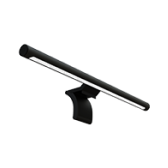
#yeelink.light.lamp22
米家智能显示器挂灯1S
urn:miot-spec-v2:device:light:0000A001:yeelink-lamp22:1:0000C802
Language
Service tree
Light#2 · light5 properties1 actions
Light
#2 · light
Properties
Power
#1 · on
- Format
- bool
- Access
- R / W / N
- Value
- —
Brightness
#2 · brightness
- Format
- uint8
- Access
- R / W / N
- Value
- 1 ~ 100, step 1 percentage
Color Temperature
#3 · color-temperature
- Format
- uint32
- Access
- R / W / N
- Value
- 2700 ~ 6500, step 1 kelvin
Default Power On State
#4 · default-power-on-state
- Format
- bool
- Access
- R / W / N
- Value
- —
Mode
#5 · mode
- Format
- uint8
- Access
- R / W / N
- Value
- 5Reading6Office7Leisure8Warmth9Computer
Actions
Toggle
#1 · toggle
yl-light#3 · yl-light22 properties13 actions
yl-light
#3 · yl-light
Properties
save-state
#1 · save-state
- Format
- bool
- Access
- R / N / W
- Value
- —
delay-time
#2 · delay-time
- Format
- uint8
- Access
- R / N / W
- Value
- 1 ~ 60, step 1 minutes
delay-off-enable
#4 · delay-off-enable
- Format
- bool
- Access
- R / N / W
- Value
- —
double-click-enable
#6 · double-click-enable
- Format
- bool
- Access
- R / N / W
- Value
- —
double-click
#7 · double-click
- Format
- uint8
- Access
- R / N / W
- Value
- 1Start Pomodoro Mode2Start Delay Off
long-press-enable
#8 · long-press-enable
- Format
- bool
- Access
- W / R / N
- Value
- —
scene-mode
#9 · scene-mode
- Format
- uint8
- Access
- R / N / W
- Value
- 0Free Mode1My Mode 12My Mode 23My Mode 34My Mode 45Reading Mode6Working Mode7Movie Mode8Warm Mode9Anti Blue-light Mode10Flow Mode
long-press-one
#13 · long-press-one
- Format
- uint8
- Access
- R / N / W
- Value
- 0 ~ 10, step 1
long-press-two
#14 · long-press-two
- Format
- uint8
- Access
- R / N / W
- Value
- 0 ~ 10, step 1
long-press-three
#15 · long-press-three
- Format
- uint8
- Access
- R / N / W
- Value
- 0 ~ 10, step 1
work-minutes
#16 · work-minutes
- Format
- uint8
- Access
- R / N / W
- Value
- 1 ~ 60, step 1 minutes
break-minutes
#17 · break-minutes
- Format
- uint8
- Access
- R / N / W
- Value
- 1 ~ 60, step 1 minutes
pomodoro-enable
#18 · pomodoro-enable
- Format
- bool
- Access
- R / N / W
- Value
- —
mode-one-bright
#19 · mode-one-bright
- Format
- uint16
- Access
- R / N / W
- Value
- 1 ~ 100, step 1 percentage
mode-one-ct
#20 · mode-one-ct
- Format
- uint16
- Access
- R / N / W
- Value
- 2700 ~ 6500, step 1
mode-two-bright
#21 · mode-two-bright
- Format
- uint16
- Access
- R / N / W
- Value
- 1 ~ 100, step 1 percentage
mode-two-ct
#22 · mode-two-ct
- Format
- uint16
- Access
- R / N / W
- Value
- 2700 ~ 6500, step 1
mode-three-bright
#23 · mode-three-bright
- Format
- uint16
- Access
- R / N / W
- Value
- 1 ~ 100, step 1 percentage
mode-three-ct
#24 · mode-three-ct
- Format
- uint16
- Access
- R / N / W
- Value
- 2700 ~ 6500, step 1
mode-four-bright
#25 · mode-four-bright
- Format
- uint16
- Access
- R / N / W
- Value
- 1 ~ 100, step 1 percentage
mode-four-ct
#26 · mode-four-ct
- Format
- uint16
- Access
- R / N / W
- Value
- 2700 ~ 6500, step 1
ble-paired-mac
#27 · ble-paired-mac
- Format
- string
- Access
- R / N / W
- Value
- —
Actions
set-default
#1 · set-default
delay-off
#2 · delay-off
Input
#2delay-timeuint8
bright-increase
#3 · bright-increase
bright-decrease
#4 · bright-decrease
bright-circle
#5 · bright-circle
bright-on-circle
#6 · bright-on-circle
ct-increase
#7 · ct-increase
ct-decrease
#8 · ct-decrease
ct-circle
#9 · ct-circle
ct-on-circle
#10 · ct-on-circle
long-press-ids-set
#13 · long-press-ids-set
Input
#13long-press-oneuint8#14long-press-twouint8#15long-press-threeuint8
long-press-ids-get
#14 · long-press-ids-get
Output
#13long-press-oneuint8#14long-press-twouint8#15long-press-threeuint8
apply-scene
#15 · apply-scene
Input
#9scene-modeuint8