
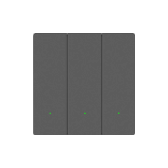
#topwit.switch.rzw33
智能开关零火三位(Mesh)
urn:miot-spec-v2:device:switch:0000A003:topwit-rzw33:1:0000C810
Language
Service tree
Left button#2 · switch2 properties1 actions
Left button
#2 · switch
Properties
Left button
#1 · on
- Format
- bool
- Access
- R / W / N
- Value
- —
Left-click function selection
#2 · mode
- Format
- uint8
- Access
- R / W / N
- Value
- 0Wired And Wireless1Wireless
Actions
Toggle
#1 · toggle
Middle button#3 · switch2 properties1 actions
Middle button
#3 · switch
Properties
Middle button
#1 · on
- Format
- bool
- Access
- R / W / N
- Value
- —
Intermediate feature selection
#2 · mode
- Format
- uint8
- Access
- R / W / N
- Value
- 0Wired And Wireless1Wireless
Actions
Toggle
#1 · toggle
Right button#4 · switch2 properties1 actions
Right button
#4 · switch
Properties
Right button
#1 · on
- Format
- bool
- Access
- R / W / N
- Value
- —
Right-click function selection
#2 · mode
- Format
- uint8
- Access
- R / W / N
- Value
- 0Wired And Wireless1Wireless
Actions
Toggle
#1 · toggle
Switch Sensor#5 · switch-sensor1 properties3 events
Switch Sensor
#5 · switch-sensor
Properties
Mode
#1 · mode
- Format
- uint8
- Access
- R / W / N
- Value
- 0Multiple Click1Quick Single Click
Events
Click
#1 · click
Double Click
#2 · double-click
Long Press
#3 · long-press
Switch Sensor#6 · switch-sensor3 events
Switch Sensor
#6 · switch-sensor
Events
Click
#1 · click
Double Click
#2 · double-click
Long Press
#3 · long-press
Switch Sensor#7 · switch-sensor3 events
Switch Sensor
#7 · switch-sensor
Events
Click
#1 · click
Double Click
#2 · double-click
Long Press
#3 · long-press
Countdown#8 · countdown1 properties
Countdown
#8 · countdown
Properties
Countdown Time
#1 · countdown-time
- Format
- uint32
- Access
- R / W / N
- Value
- 0 ~ 1440, step 1 minutes
Countdown#9 · countdown1 properties
Countdown
#9 · countdown
Properties
Countdown Time
#1 · countdown-time
- Format
- uint32
- Access
- R / W / N
- Value
- 0 ~ 1440, step 1 minutes
Countdown#10 · countdown1 properties
Countdown
#10 · countdown
Properties
Countdown Time
#1 · countdown-time
- Format
- uint32
- Access
- R / W / N
- Value
- 0 ~ 1440, step 1 hours
Left jog delay milliseconds#11 · jog-delay-time1 properties
Left jog delay milliseconds
#11 · jog-delay-time
Properties
The number of milliseconds of key jog delay
#1 · jog-delay-time
- Format
- uint16
- Access
- R / W / N
- Value
- 0 ~ 65535, step 1
The number of milliseconds of middle jog delay#12 · jog-delay-time1 properties
The number of milliseconds of middle jog delay
#12 · jog-delay-time
Properties
The number of milliseconds of key jog delay
#1 · jog-delay-time
- Format
- uint16
- Access
- R / W / N
- Value
- 0 ~ 65535, step 1
Right-click delay milliseconds#13 · jog-delay-time1 properties
Right-click delay milliseconds
#13 · jog-delay-time
Properties
The number of milliseconds of key jog delay
#1 · jog-delay-time
- Format
- uint16
- Access
- R / W / N
- Value
- 0 ~ 65535, step 1
The left button corresponds to the relay number#14 · switch-relay1 properties
The left button corresponds to the relay number
#14 · switch-relay
Properties
The keys correspond to the relay number
#1 · switch-relay
- Format
- uint8
- Access
- R / W / N
- Value
- 0 ~ 3, step 1
The middle button corresponds to the relay number#15 · switch-relay1 properties
The middle button corresponds to the relay number
#15 · switch-relay
Properties
The keys correspond to the relay number
#1 · switch-relay
- Format
- uint8
- Access
- R / W / N
- Value
- 0 ~ 3, step 1
The right button corresponds to the relay number#16 · switch-relay1 properties
The right button corresponds to the relay number
#16 · switch-relay
Properties
The keys correspond to the relay number
#1 · switch-relay
- Format
- uint8
- Access
- R / W / N
- Value
- 0 ~ 3, step 1
Default state after left-click power-up#17 · default-state1 properties
Default state after left-click power-up
#17 · default-state
Properties
Default state after power-up
#1 · default-state
- Format
- uint8
- Access
- R / W / N
- Value
- 0On1Off2Restore
The default state after the middle button is powered on#18 · default-state1 properties
The default state after the middle button is powered on
#18 · default-state
Properties
Default state after power-up
#1 · default-state
- Format
- uint8
- Access
- R / W / N
- Value
- 0On1Off2Restore
The default state after right-clicking power-up#19 · default-state1 properties
The default state after right-clicking power-up
#19 · default-state
Properties
Default state after power-up
#1 · default-state
- Format
- uint8
- Access
- R / W / N
- Value
- 0On1Off2Restore
Key backlight mode#21 · backlight-when-off3 properties
Key backlight mode
#21 · backlight-when-off
Properties
Left-click backlight mode
#1 · backlight-mode-i
- Format
- uint8
- Access
- R / W / N
- Value
- 0Off1On2Blink
Middle button backlight mode
#2 · backlight-mode-ii
- Format
- uint8
- Access
- R / W / N
- Value
- 0Off1On2Blink
Right-click backlight mode
#3 · backlight-mode-iii
- Format
- uint8
- Access
- R / W / N
- Value
- 0Off1On2Blink
Device launch flag#22 · online-counter1 properties
Device launch flag
#22 · online-counter
Properties
Device online identification
#1 · online-counter
- Format
- uint32
- Access
- W / N
- Value
- 0 ~ 4294967295, step 1
Mutual control is allowed, and deregulation is allowed#23 · mutual-control3 properties
Mutual control is allowed, and deregulation is allowed
#23 · mutual-control
Properties
One-click mutual control allows, uncontrol allows
#1 · mutual-control-i
- Format
- bool
- Access
- W
- Value
- —
Two-button mutual control is allowed, and de-control is allowed
#2 · mutual-control-ii
- Format
- bool
- Access
- W
- Value
- —
Three-button mutual control is allowed, and decontrol is allowed
#3 · mutual-control-iii
- Format
- bool
- Access
- W
- Value
- —
Left-click remote control binding table#24 · switch-panel11 properties
Left-click remote control binding table
#24 · switch-panel
Properties
Remote Control 1 MAC address is low 4 bytes
#1 · panel-mac-a
- Format
- uint32
- Access
- R / W / N
- Value
- 0 ~ 4294967295, step 1
Remote Control 2 MAC address is low 4 bytes
#2 · panel-mac-b
- Format
- uint32
- Access
- R / W / N
- Value
- 0 ~ 4294967295, step 1
Remote Control 3 MAC address is low 4 bytes
#3 · panel-mac-c
- Format
- uint32
- Access
- R / W / N
- Value
- 0 ~ 4294967295, step 1
Remote Control 4 MAC address is low 4 bytes
#4 · panel-mac-d
- Format
- uint32
- Access
- R / W / N
- Value
- 0 ~ 4294967295, step 1
Remote Control 5 MAC address is low 4 bytes
#5 · panel-mac-e
- Format
- uint32
- Access
- R / W / N
- Value
- 0 ~ 4294967295, step 1
Remote Control 6 MAC address is low 4 bytes
#6 · panel-mac-f
- Format
- uint32
- Access
- R / W / N
- Value
- 0 ~ 4294967295, step 1
Remote Control 7 MAC address is low 4 bytes
#7 · panel-mac-g
- Format
- uint32
- Access
- R / W / N
- Value
- 0 ~ 4294967295, step 1
Remote Control 8 MAC address is low 4 bytes
#8 · panel-mac-h
- Format
- uint32
- Access
- R / W / N
- Value
- 0 ~ 4294967295, step 1
Remote Control 9 MAC address is low 4 bytes
#9 · panel-mac-i
- Format
- uint32
- Access
- R / W / N
- Value
- 0 ~ 4294967295, step 1
Remote Control 10 MAC address is low 4 bytes
#10 · panel-mac-j
- Format
- uint32
- Access
- R / W / N
- Value
- 0 ~ 4294967295, step 1
Remote Control 11 MAC address is low 4 bytes
#11 · panel-mac-k
- Format
- uint32
- Access
- R / W / N
- Value
- 0 ~ 4294967295, step 1
Middle-click remote control binding table#25 · switch-panel11 properties
Middle-click remote control binding table
#25 · switch-panel
Properties
Remote Control 1 MAC address is low 4 bytes
#1 · panel-mac-a
- Format
- uint32
- Access
- R / W / N
- Value
- 0 ~ 4294967295, step 1
Remote Control 2 MAC address is low 4 bytes
#2 · panel-mac-b
- Format
- uint32
- Access
- R / W / N
- Value
- 0 ~ 4294967295, step 1
Remote Control 3 MAC address is low 4 bytes
#3 · panel-mac-c
- Format
- uint32
- Access
- R / W / N
- Value
- 0 ~ 4294967295, step 1
Remote Control 4 MAC address is low 4 bytes
#4 · panel-mac-d
- Format
- uint32
- Access
- R / W / N
- Value
- 0 ~ 4294967295, step 1
Remote Control 5 MAC address is low 4 bytes
#5 · panel-mac-e
- Format
- uint32
- Access
- R / W / N
- Value
- 0 ~ 4294967295, step 1
Remote Control 6 MAC address is low 4 bytes
#6 · panel-mac-f
- Format
- uint32
- Access
- R / W / N
- Value
- 0 ~ 4294967295, step 1
Remote Control 7 MAC address is low 4 bytes
#7 · panel-mac-g
- Format
- uint32
- Access
- R / W / N
- Value
- 0 ~ 4294967295, step 1
Remote Control 8 MAC address is low 4 bytes
#8 · panel-mac-h
- Format
- uint32
- Access
- R / W / N
- Value
- 0 ~ 4294967295, step 1
Remote Control 9 MAC address is low 4 bytes
#9 · panel-mac-i
- Format
- uint32
- Access
- R / W / N
- Value
- 0 ~ 4294967295, step 1
Remote Control 10 MAC address is low 4 bytes
#10 · panel-mac-j
- Format
- uint32
- Access
- R / W / N
- Value
- 0 ~ 4294967295, step 1
Remote Control 11 MAC address is low 4 bytes
#11 · panel-mac-k
- Format
- uint32
- Access
- R / W / N
- Value
- 0 ~ 4294967295, step 1
Right-click the remote control binding table#26 · switch-panel11 properties
Right-click the remote control binding table
#26 · switch-panel
Properties
Remote Control 1 MAC address is low 4 bytes
#1 · panel-mac-a
- Format
- uint32
- Access
- R / W / N
- Value
- 0 ~ 4294967295, step 1
Remote Control 2 MAC address is low 4 bytes
#2 · panel-mac-b
- Format
- uint32
- Access
- R / W / N
- Value
- 0 ~ 4294967295, step 1
Remote Control 3 MAC address is low 4 bytes
#3 · panel-mac-c
- Format
- uint32
- Access
- R / W / N
- Value
- 0 ~ 4294967295, step 1
Remote Control 4 MAC address is low 4 bytes
#4 · panel-mac-d
- Format
- uint32
- Access
- R / W / N
- Value
- 0 ~ 4294967295, step 1
Remote Control 5 MAC address is low 4 bytes
#5 · panel-mac-e
- Format
- uint32
- Access
- R / W / N
- Value
- 0 ~ 4294967295, step 1
Remote Control 6 MAC address is low 4 bytes
#6 · panel-mac-f
- Format
- uint32
- Access
- R / W / N
- Value
- 0 ~ 4294967295, step 1
Remote Control 7 MAC address is low 4 bytes
#7 · panel-mac-g
- Format
- uint32
- Access
- R / W / N
- Value
- 0 ~ 4294967295, step 1
Remote Control 8 MAC address is low 4 bytes
#8 · panel-mac-h
- Format
- uint32
- Access
- R / W / N
- Value
- 0 ~ 4294967295, step 1
Remote Control 9 MAC address is low 4 bytes
#9 · panel-mac-i
- Format
- uint32
- Access
- R / W / N
- Value
- 0 ~ 4294967295, step 1
Remote Control 10 MAC address is low 4 bytes
#10 · panel-mac-j
- Format
- uint32
- Access
- R / W / N
- Value
- 0 ~ 4294967295, step 1
Remote Control 11 MAC address is low 4 bytes
#11 · panel-mac-k
- Format
- uint32
- Access
- R / W / N
- Value
- 0 ~ 4294967295, step 1
Press the key to enter the remote control binding state#27 · panel-add-enable3 properties
Press the key to enter the remote control binding state
#27 · panel-add-enable
Properties
Left-click to enter the remote control binding state
#1 · panel-add-enable-a
- Format
- bool
- Access
- R / W / N
- Value
- —
The middle button enters the remote control binding state
#2 · panel-add-enable-b
- Format
- bool
- Access
- R / W / N
- Value
- —
Right-click to enter the remote control binding state
#3 · panel-add-enable-c
- Format
- bool
- Access
- R / W / N
- Value
- —
Press the key to enter the flexible switch mode#28 · flexible-mode3 properties
Press the key to enter the flexible switch mode
#28 · flexible-mode
Properties
Left-click to enter Smart Switch Mode
#1 · flexible-mode-a
- Format
- bool
- Access
- R / W / N
- Value
- —
Middle click to enter Smart Switch mode
#2 · flexible-mode-b
- Format
- bool
- Access
- R / W / N
- Value
- —
Right-click to enter the Smart Switch Mode
#3 · flexible-mode-c
- Format
- bool
- Access
- R / W / N
- Value
- —