
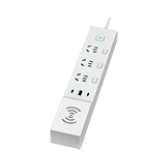
#oit.plug.cb2
欧伦特智能插座CB2
urn:miot-spec-v2:device:outlet:0000A002:oit-cb2:1:0000D032
Language
Service tree
Switch#2 · switch3 properties1 actions
Switch
#2 · switch
Properties
Switch Status
#1 · on
- Format
- bool
- Access
- R / W / N
- Value
- —
Default Power On State
#2 · default-power-on-state
- Format
- uint8
- Access
- R / W / N
- Value
- 0Default1Off2On
Device Fault
#3 · fault
- Format
- uint8
- Access
- R / N
- Value
- 0No Fault1Over Temperature2Overload
Actions
Toggle
#1 · toggle
Power Consumption#3 · power-consumption4 properties
Power Consumption
#3 · power-consumption
Properties
Power Consumption
#1 · power-consumption
- Format
- float
- Access
- R / N
- Value
- 0 ~ 65535, step 0.01 kWh
Electric Power
#2 · electric-power
- Format
- uint16
- Access
- R / N
- Value
- 0 ~ 10000, step 1 watt
Power Consumption Accumulate Way
#3 · power-consumption-accumulation-way
- Format
- bool
- Access
- R / N
- Value
- —
Electric Current
#4 · electric-current
- Format
- float
- Access
- R / N
- Value
- 0 ~ 255, step 0.1 A
Physical Controls Locked#5 · physical-controls-locked1 properties
Physical Controls Locked
#5 · physical-controls-locked
Properties
Physical Controls Locked
#1 · physical-controls-locked
- Format
- bool
- Access
- R / W / N
- Value
- —
Switch#10 · switch1 properties1 actions
Switch
#10 · switch
Properties
Switch Status
#1 · on
- Format
- bool
- Access
- R / W / N
- Value
- —
Actions
Toggle
#1 · toggle
AC1#7 · switch-ac3 properties1 actions
AC1
#7 · switch-ac
Properties
false: off true: on
#1 · on
- Format
- bool
- Access
- R / N / W
- Value
- —
Loop status: true: enabled. false: not enabled
#2 · status
- Format
- bool
- Access
- R / N / W
- Value
- —
Data string
#3 · data-value
- Format
- string
- Access
- R / N / W
- Value
- —
Actions
On/Off
#1 · toggle
AC2#8 · switch-ac3 properties1 actions
AC2
#8 · switch-ac
Properties
false: off true: on
#1 · on
- Format
- bool
- Access
- R / N / W
- Value
- —
Loop status: true: enabled. false: not enabled
#2 · cyc-status
- Format
- bool
- Access
- R / N / W
- Value
- —
Data string
#3 · data-value
- Format
- string
- Access
- R / N / W
- Value
- —
Actions
On/Off
#1 · toggle
AC3#9 · switch-ac3 properties1 actions
AC3
#9 · switch-ac
Properties
false: off true: on
#1 · on
- Format
- bool
- Access
- R / N / W
- Value
- —
Loop status: true: enabled. false: not enabled
#2 · status
- Format
- bool
- Access
- R / N / W
- Value
- —
data
#3 · data-value
- Format
- string
- Access
- R / N / W
- Value
- —
Actions
On/Off
#1 · toggle
Electricity consumption indication#11 · use-ele-alert3 properties
Electricity consumption indication
#11 · use-ele-alert
Properties
Power consumption indicator switch
#1 · on
- Format
- bool
- Access
- R / N / W
- Value
- —
Alarm value of the daily power consumption
#2 · day-ele-alert
- Format
- uint8
- Access
- R / N / W
- Value
- 1 ~ 60, step 1 kWh
Alarm value of the monthly power consumption
#3 · month-ele-alert
- Format
- uint16
- Access
- R / N / W
- Value
- 20 ~ 1800, step 20 kWh
USB loop task#12 · usb-cyc-task2 properties
USB loop task
#12 · usb-cyc-task
Properties
The value is true: enabled. false: not enabled
#1 · status
- Format
- bool
- Access
- R / N / W
- Value
- —
data
#2 · data-value
- Format
- string
- Access
- R / N / W
- Value
- —
Custom indicator configuration#13 · indicator-light4 properties
Custom indicator configuration
#13 · indicator-light
Properties
Indicator switch
#1 · on
- Format
- bool
- Access
- R / N / W
- Value
- —
Do not disturb mode switch
#2 · mode
- Format
- bool
- Access
- R / N / W
- Value
- —
Start time
#3 · start-time
- Format
- uint16
- Access
- R / N / W
- Value
- 0 ~ 1440, step 1 minutes
End time
#4 · end-time
- Format
- uint16
- Access
- R / W / N
- Value
- 0 ~ 1440, step 1 minutes
Wireless charging#15 · wireless-charging3 properties
Wireless charging
#15 · wireless-charging
Properties
Wireless charging switch
#1 · switch
- Format
- bool
- Access
- R / N / W
- Value
- —
The value is true: enabled. false: not enabled
#2 · status
- Format
- bool
- Access
- R / N / W
- Value
- —
data
#3 · data-value
- Format
- string
- Access
- R / N / W
- Value
- —