
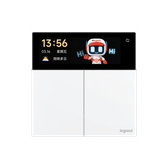
#lhz.switch.sw2c03
罗格朗维翼二位彩屏智能开关Pro
urn:miot-spec-v2:device:switch:0000A003:lhz-sw2c03:1:0000C809
Language
Service tree
Left Switch Service#2 · switch2 properties1 actions
Left Switch Service
#2 · switch
Properties
Left Button
#1 · on
- Format
- bool
- Access
- R / W / N
- Value
- —
Mode
#2 · mode
- Format
- uint8
- Access
- R / N / W
- Value
- 0Wired And Wireless1Wireless
Actions
Toggle
#1 · toggle
Right Switch Service#3 · switch2 properties1 actions
Right Switch Service
#3 · switch
Properties
Right Button
#1 · on
- Format
- bool
- Access
- R / W / N
- Value
- —
Mode
#2 · mode
- Format
- uint8
- Access
- R / N / W
- Value
- 0Wired And Wireless1Wireless
Actions
Toggle
#1 · toggle
Left Switch Sensor#4 · switch-sensor1 properties3 events
Left Switch Sensor
#4 · switch-sensor
Properties
Mode
#1 · mode
- Format
- uint8
- Access
- R / W / N
- Value
- 0Multiple Click1Quick Single Click
Events
Click
#1 · click
Double Click
#2 · double-click
Long Press
#3 · long-press
Right Switch Sensor#5 · switch-sensor1 properties3 events
Right Switch Sensor
#5 · switch-sensor
Properties
Mode
#1 · mode
- Format
- uint8
- Access
- R / W / N
- Value
- 0Multiple Click1Quick Single Click
Events
Click
#1 · click
Double Click
#2 · double-click
Long Press
#3 · long-press
Button Enter Online Momentary Mode#8 · flexible-mode2 properties
Button Enter Online Momentary Mode
#8 · flexible-mode
Properties
Button 1 Enter Online Momentary Mode
#1 · flexible-mode-a
- Format
- bool
- Access
- R / W / N
- Value
- —
Button 2 Enters Online Momentary Mode
#2 · flexible-mode-b
- Format
- bool
- Access
- R / W / N
- Value
- —
Button 1 Momentary Milliseconds#9 · jog-delay-time1 properties
Button 1 Momentary Milliseconds
#9 · jog-delay-time
Properties
Button Momentary Delay Milliseconds
#1 · jog-delay-time
- Format
- uint16
- Access
- R / W / N
- Value
- 0 ~ 65535, step 1
Button 2 Momentary Milliseconds#10 · jog-delay-time1 properties
Button 2 Momentary Milliseconds
#10 · jog-delay-time
Properties
Button Momentary Delay Milliseconds
#1 · jog-delay-time
- Format
- uint16
- Access
- R / W / N
- Value
- 0 ~ 65535, step 1
Left button load mapping#11 · switch-relay1 properties
Left button load mapping
#11 · switch-relay
Properties
Load mapping corresponding to button
#1 · switch-relay
- Format
- uint8
- Access
- R / W / N
- Value
- 0 ~ 3, step 1
Right button load mapping#12 · switch-relay1 properties
Right button load mapping
#12 · switch-relay
Properties
Load mapping corresponding to button
#1 · switch-relay
- Format
- uint8
- Access
- R / W / N
- Value
- 0 ~ 3, step 1
Left Button Default State After Power On#13 · default-state1 properties
Left Button Default State After Power On
#13 · default-state
Properties
Default State After Power On
#1 · default-state
- Format
- uint8
- Access
- N / R / W
- Value
- 0On1Off2Restore
Right Button Default State After Power On#14 · default-state1 properties
Right Button Default State After Power On
#14 · default-state
Properties
Default State After Power On
#1 · default-state
- Format
- uint8
- Access
- R / W / N
- Value
- 0On1Off2Restore
Page Button Backlight Mode#15 · backlight-mode1 properties
Page Button Backlight Mode
#15 · backlight-mode
Properties
Page Backlight Mode
#1 · backlight-mode-i
- Format
- uint8
- Access
- R / W / N
- Value
- 0Off1On2Blink
Button Enter Momentary Mode#20 · jog-enable2 properties
Button Enter Momentary Mode
#20 · jog-enable
Properties
Button 1 Enters Momentary Mode
#1 · jog-enable-a
- Format
- bool
- Access
- R / W / N
- Value
- —
Button 2 Enters Momentary Mode
#2 · jog-enable-b
- Format
- bool
- Access
- R / W / N
- Value
- —
Left Button Online Momentary Delay#21 · flexible-time1 properties
Left Button Online Momentary Delay
#21 · flexible-time
Properties
Online button momentary delay in milliseconds
#1 · flexible-time
- Format
- uint16
- Access
- R / W / N
- Value
- 0 ~ 65535, step 1
Right Button Online Momentary Delay#22 · flexible-time1 properties
Right Button Online Momentary Delay
#22 · flexible-time
Properties
Online button momentary delay in milliseconds
#1 · flexible-time
- Format
- uint16
- Access
- R / W / N
- Value
- 0 ~ 65535, step 1
2-Key Button Text Settings#24 · text-set8 properties
2-Key Button Text Settings
#24 · text-set
Properties
a1
#1 · a1
- Format
- uint32
- Access
- R / W / N
- Value
- 0 ~ 4294967295, step 1
a2
#2 · a2
- Format
- uint32
- Access
- R / W / N
- Value
- 0 ~ 4294967295, step 1
a3
#3 · a3
- Format
- uint32
- Access
- R / W / N
- Value
- 0 ~ 4294967295, step 1
a4
#4 · a4
- Format
- uint32
- Access
- R / W / N
- Value
- 0 ~ 4294967295, step 1
b1
#5 · b1
- Format
- uint32
- Access
- R / W / N
- Value
- 0 ~ 4294967295, step 1
b2
#6 · b2
- Format
- uint32
- Access
- R / W / N
- Value
- 0 ~ 4294967295, step 1
b3
#7 · b3
- Format
- uint32
- Access
- R / W / N
- Value
- 0 ~ 4294967295, step 1
b4
#8 · b4
- Format
- uint32
- Access
- R / W / N
- Value
- 0 ~ 4294967295, step 1
2-Key Mijia Scene Text Settings#25 · text-set-misence8 properties
2-Key Mijia Scene Text Settings
#25 · text-set-misence
Properties
a1
#1 · a1
- Format
- uint32
- Access
- R / W / N
- Value
- 0 ~ 4294967295, step 1
a2
#2 · a2
- Format
- uint32
- Access
- R / W / N
- Value
- 0 ~ 4294967295, step 1
a3
#3 · a3
- Format
- uint32
- Access
- R / W / N
- Value
- 0 ~ 4294967295, step 1
a4
#4 · a4
- Format
- uint32
- Access
- R / W / N
- Value
- 0 ~ 4294967295, step 1
b1
#5 · b1
- Format
- uint32
- Access
- R / W / N
- Value
- 0 ~ 4294967295, step 1
b2
#6 · b2
- Format
- uint32
- Access
- R / W / N
- Value
- 0 ~ 4294967295, step 1
b3
#7 · b3
- Format
- uint32
- Access
- R / W / N
- Value
- 0 ~ 4294967295, step 1
b4
#8 · b4
- Format
- uint32
- Access
- R / W / N
- Value
- 0 ~ 4294967295, step 1
1-Channel Curtain Text Settings#27 · text-set-curtain5 properties
1-Channel Curtain Text Settings
#27 · text-set-curtain
Properties
a1
#1 · a1
- Format
- uint32
- Access
- N / W / R
- Value
- 0 ~ 4294967295, step 1
a2
#2 · a2
- Format
- uint32
- Access
- R / W / N
- Value
- 0 ~ 4294967295, step 1
a3
#3 · a3
- Format
- uint32
- Access
- R / W / N
- Value
- 0 ~ 4294967295, step 1
a4
#4 · a4
- Format
- uint32
- Access
- R / W / N
- Value
- 0 ~ 4294967295, step 1
Curtain 1 Opening Percentage Setting
#5 · opening-fit-a
- Format
- uint8
- Access
- N
- Value
- 0 ~ 100, step 1
Page Switch#28 · page-switch1 properties
Page Switch
#28 · page-switch
Properties
Page Switch
#1 · page-switch
- Format
- uint8
- Access
- W
- Value
- 0SWITCH1MISENCE3CURTAIN
Scene and Device Binding & Unbinding#29 · bind-unbind1 properties
Scene and Device Binding & Unbinding
#29 · bind-unbind
Properties
Curtain Binding & Unbinding
#2 · curtain-a
- Format
- bool
- Access
- W
- Value
- —
Screensaver Settings#30 · theme-setting2 properties
Screensaver Settings
#30 · theme-setting
Properties
Screensaver Settings
#1 · theme-setting
- Format
- uint8
- Access
- R / W / N
- Value
- 0TIME1CAT2ZHIGAN3CAIYUAN
Standby Interface Switch
#2 · sleeppage-en
- Format
- bool
- Access
- R / W / N
- Value
- —
Main Interface Settings#31 · interface-seting1 properties
Main Interface Settings
#31 · interface-seting
Properties
Main Interface Settings
#1 · interface-seting
- Format
- uint8
- Access
- R / W / N
- Value
- 0SWITCH1MISENCE3CURTAIN4Light
Screen Backlight Brightness and Sensor Settings#32 · backlight-mode-ii7 properties2 events
Screen Backlight Brightness and Sensor Settings
#32 · backlight-mode-ii
Properties
Screen Backlight Brightness Settings
#1 · backlight-set
- Format
- uint8
- Access
- R / W / N
- Value
- 0OFF1SLEEP2SOFT3LIGHTNESS
Auto Screen Off Switch
#2 · proximity-induction
- Format
- bool
- Access
- R / W / N
- Value
- —
Sensor Screen Off Time
#3 · pause-time
- Format
- uint16
- Access
- R / W / N
- Value
- 5 ~ 300, step 1
Radar Sensing Distance Settings
#4 · radar-set
- Format
- uint8
- Access
- R / W / N
- Value
- 0Close1Mid2Far
Approach to Light Up Screen
#5 · close-bright
- Format
- bool
- Access
- R / W / N
- Value
- —
Approach to Light Up and Unlock
#6 · close-bright-unlock
- Format
- bool
- Access
- R / W / N
- Value
- —
Approach to Unlock
#7 · close-unlock
- Format
- bool
- Access
- R / W / N
- Value
- —
Events
IR Sensor - Person Detected
#1 · ir-reaction
IR Sensor - No Person After Delay
#2 · ir-noninduction
Mijia Trigger Automation Event#33 · automated-event4 events
Mijia Trigger Automation Event
#33 · automated-event
Events
Curtain - Open
#1 · curtain-on
Curtain - Close
#2 · curtain-off
Mijia Scene 1
#3 · mi-sence-i
Mi Home Scene 2
#4 · mi-sence-ii
Page Display or Hide#35 · page-on-off2 properties
Page Display or Hide
#35 · page-on-off
Properties
Mijia Scene Page Enable/Disable
#1 · mi-sence
- Format
- bool
- Access
- R / W / N
- Value
- —
Curtain Control Page On/Off
#3 · curtain
- Format
- bool
- Access
- R / W / N
- Value
- —
Message Board#36 · massage-board6 properties1 actions
Message Board
#36 · massage-board
Properties
Text Input
#1 · text
- Format
- uint32
- Access
- W
- Value
- 0 ~ 4294967295, step 1
Display Status
#2 · status
- Format
- uint8
- Access
- R / N
- Value
- 0Display1Feedback
Message Status
#3 · message-status
- Format
- uint8
- Access
- R / W / N
- Value
- 0Normal1Romantic2Urgent3Come-on4Warm-cozy
Display Mode
#4 · display-method
- Format
- uint8
- Access
- R / W / N
- Value
- 0Now1Time2Link
Scheduled Time Display Settings
#5 · timed-display
- Format
- uint16
- Access
- R / W / N
- Value
- 0 ~ 65535, step 1
Display Switch
#6 · display-on-off
- Format
- bool
- Access
- R / W / N
- Value
- —
Actions
Message Board Display Trigger (Requires Message Setup)
#1 · message-board
Time Weather Sync#37 · calibration1 properties1 actions
Time Weather Sync
#37 · calibration
Properties
Phone Time Push
#1 · utc
- Format
- uint32
- Access
- W
- Value
- 0 ~ 4294967295, step 1
Actions
Weather Time Gateway Calibration
#1 · calibration
Button Prompt Sound Settings#38 · prompt-tone4 properties
Button Prompt Sound Settings
#38 · prompt-tone
Properties
Button Sound Switch
#1 · switcha-on-off
- Format
- bool
- Access
- R / W / N
- Value
- —
Button Music Selection
#2 · swticha-chose
- Format
- uint8
- Access
- R / W / N
- Value
- 0Default1122334455667788991010
Button 2 sound switch
#3 · switchb-on-off
- Format
- bool
- Access
- R / W / N
- Value
- —
Button 2 keypress music selection
#4 · switchb-chose
- Format
- uint8
- Access
- R / W / N
- Value
- 0Default1122334455667788991010
Operation Log#39 · operation-log2 properties
Operation Log
#39 · operation-log
Properties
Button 1 Operation Log - High 4 bits represent type, low 4 bits represent state
#1 · key-a
- Format
- uint8
- Access
- N
- Value
- 0 ~ 255, step 1
Button 2 Operation Log - High 4 bits represent type, low 4 bits represent state
#2 · key-b
- Format
- uint8
- Access
- N
- Value
- 0 ~ 255, step 1
Anticipated Day Settings#40 · countdown-date4 properties
Anticipated Day Settings
#40 · countdown-date
Properties
Anticipated Day Screensaver Switch
#1 · countdown-on-off
- Format
- bool
- Access
- R / W / N
- Value
- —
Background Image Settings
#2 · bakpicture-set
- Format
- uint8
- Access
- R / W / N
- Value
- 0General1Party2Marry3Birthday4Travel5Festive
Occurrence Date
#3 · date
- Format
- uint32
- Access
- R / W / N
- Value
- 0 ~ 4294967295, step 1
Text Input
#4 · text-sync
- Format
- uint32
- Access
- W
- Value
- 0 ~ 4294967295, step 1
Activation Time#41 · activation-time1 properties
Activation Time
#41 · activation-time
Properties
Activation Time
#1 · activation-time
- Format
- uint32
- Access
- R / N
- Value
- 0 ~ 4294967295, step 1
Button Sound Automation#42 · automation1 properties
Button Sound Automation
#42 · automation
Properties
Automation Play Music
#1 · automation
- Format
- uint8
- Access
- W
- Value
- 0Default1122334455667788991010